The BetPKR APK is the Android installer for the BetPKR Game app. It is not listed on Google Play, which means the file has to come straight from the official BetPKR page. That single fact decides whether your account stays safe, because the most common way players lose money is by installing a copied file from a group chat. This article explains where the real APK lives, how to install and update it and how to recognise a fake.
Where the Real BetPKR APK Comes From
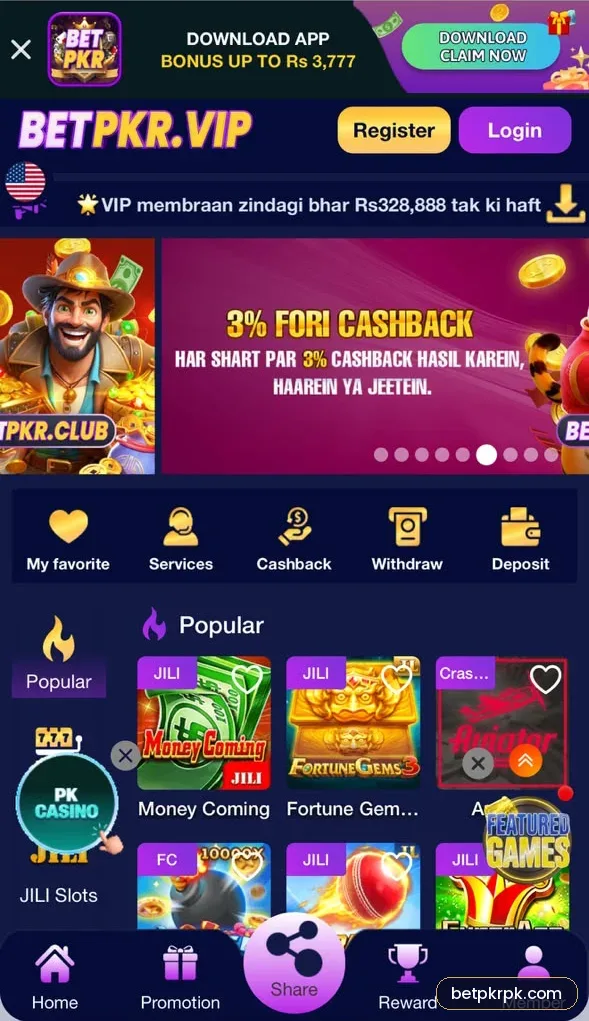
Open the official BetPKR link in Chrome. At the very top of the home screen there is a purple strip with the BetPKR icon, the line Download App Bonus up to Rs 3,777 and a green button labelled Download Claim Now. That button always serves the current file, so you never have to hunt for a version number or compare file names. Anything sent to you by a stranger on WhatsApp, Telegram or Facebook should be ignored, even if the icon looks right. A modified file can read your screen, copy your password or push you to a fake deposit page.
Install the APK Step by Step
- Free at least 150 MB of storage so the install does not stop halfway.
- Connect to Wi-Fi and tap Download Claim Now on the official page.
- When the download finishes, tap the file in the notification bar and choose Install.
- If Android shows a warning about unknown apps, allow it for Chrome only and switch the setting off again after the install.
- Open BetPKR, tap Login and enter your username and password.
Updating Without Losing Anything
Your balance, VIP level and rewards are stored on the BetPKR server, not inside the file on your phone. That means updating is low risk. When the app asks for a new version, or when a screen stops loading after a change on the site, download the APK again from the same official button and install it over the old one. Android keeps your login in most cases. If the new file refuses to install on top of the old one, uninstall the old app first, then install the fresh file and log in again with your username.
Permissions a Normal Gaming App Needs
| Permission | Reasonable use |
|---|---|
| Internet | Loading games, balance and offers |
| Notifications | Event alerts and bonus reminders |
| Storage or photos | Saving a QR code or a receipt image |
An APK that asks to read your SMS messages, access your contacts or use accessibility services is a red flag. Those permissions can be used to steal codes and control the phone. Delete such a file at once and download again from the official page.
Signs That an APK Is Fake
- It reached you through a forwarded message rather than the official site.
- The app name has a small spelling change or the icon looks blurry.
- The file size is far smaller or far larger than usual.
- It asks for a deposit to an account shown in a chat window instead of the deposit page.
What to Do Right After Installing
A fresh install is the best moment to set the account up properly. Log in, open the Member area and check that the balance matches what you saw in the browser. Then visit Promotion and read the app download offer, because the strip advertises a bonus of up to Rs 3,777 and the popup mentions up to Rs 2,888, and the card explains which one applies to you and what it asks in return. Finally, add the two or three games you actually play to My favorite with the heart button so the lobby stays tidy.
Frequently Asked Questions
Is the BetPKR APK on the Play Store?
No. The only safe source is the official BetPKR page and its Download Claim Now button.
How do I know I have the latest version?
Download from the official button whenever the app asks for an update. That button always points to the current file.
Will reinstalling delete my balance?
No. Your balance lives on the server. Log in again with your username and password after reinstalling.
Read next BetPKR App Download BetPKR on iPhone
Opens the official BetPKR download page. Customer service is one tap away if you get stuck.